

Key Facts
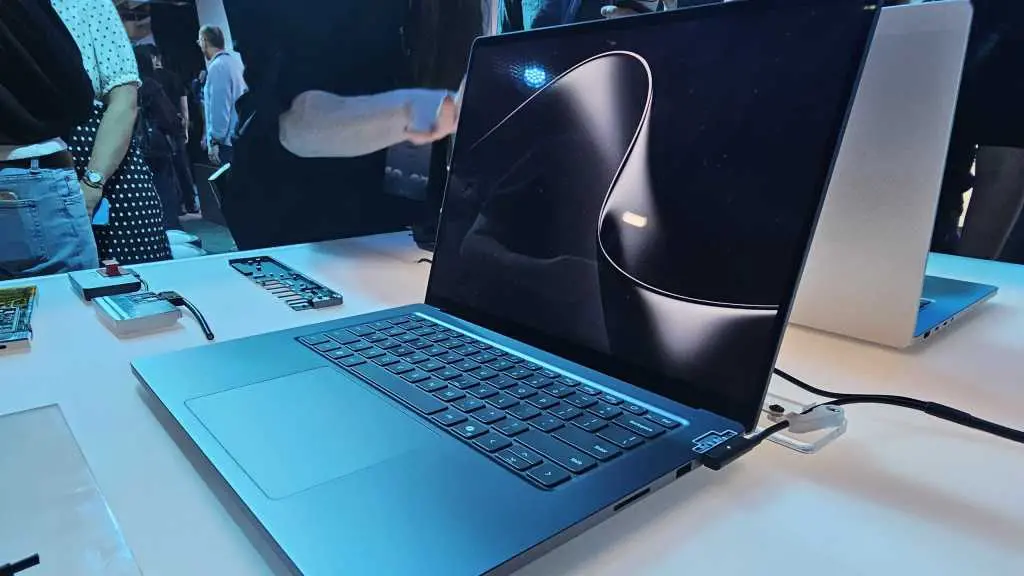
- Microsoft has introduced the Surface Laptop Ultra, a high-end laptop built for local AI workloads.
- The device uses a MediaTek CPU and Nvidia's RTX Spark system-on-chip.
- Microsoft describes the approach as hybrid intelligence, combining on-device AI with cloud-based Copilot when more power is needed.
- The laptop ships with a 140W power adapter, a sign of high power consumption.
- Battery life has not been announced, with Microsoft saying details will come closer to availability.
- The starting price is $2,599, and upgrades for more memory will likely push the cost much higher.
- Dell, HP, MSI, and other PC makers will offer five competing laptops with similar positioning.
- Airplane power outlets commonly deliver 60W to 100W, according to airline power experts, which may be less than the Ultra needs.
- Microsoft demonstrated a single Gears of War game on the device but did not share frame rates.
- The launch comes as Apple's $699 MacBook Neo has drawn attention to affordable, efficient laptops.
A Portable AI Workstation With a Laptop Dilemma
Microsoft's newest flagship notebook is not just another thin-and-light PC. The Surface Laptop Ultra is being positioned as a portable AI workstation, a machine built to run local AI models, developer tools, and generative workloads directly on the user's lap. The pitch is ambitious: instead of sending every request to the cloud, users can keep some AI processing local, reducing latency, improving privacy, and potentially lowering long-term cloud costs. But the same design choices that make the Ultra an AI monster also create a laptop problem.
The core of the system is a MediaTek CPU paired with Nvidia's RTX Spark SoC. That combination is unusual for a mainstream Surface device. MediaTek is best known for efficient mobile and embedded processors, while Nvidia's RTX Spark brings serious graphics and AI acceleration. Together, they are meant to handle local inference, fine-tuning, and AI-assisted creation without relying entirely on remote servers. Microsoft calls this strategy hybrid intelligence. The idea is that users should not have to care whether a task runs locally or in the cloud; the system will tap Copilot AI for additional horsepower when needed.
That flexibility sounds appealing, but it also reveals a compromise. AI features in productivity software are polarizing. Some users welcome automated summaries, code suggestions, and image generation. Others see them as intrusive, unreliable, or unnecessary. By building a laptop around local AI, Microsoft is betting that a sufficiently large group of developers, creators, and enthusiasts will want dedicated hardware for these tasks. The question is whether that group is large enough to support a premium device with an unclear battery story.
Power Draw and the Battery Unknown
The 140W power adapter is one of the most telling details about the Surface Laptop Ultra. Typical ultraportables often ship with 45W to 65W chargers. Even many gaming laptops use 180W to 240W adapters, so 140W sits in an awkward middle ground. It signals that the Ultra can consume far more power than a standard productivity laptop, but it may not have the sustained cooling or battery capacity of a full gaming rig. Microsoft has not positioned it primarily as a gaming machine, yet the company showed a single Gears of War game running on the device without indicating frame rate, resolution, or settings. That omission leaves the Ultra's gaming credentials unclear.
More importantly, battery life remains a black box. At the launch event, no one from Microsoft could answer what kind of endurance users should expect. The official specification page states that battery life details will be shared closer to availability and that actual runtime varies based on usage, settings, configuration, and other factors. That is standard language, but it is also a warning. Running local AI models can be extremely power-hungry. A large language model may keep the CPU, GPU, and memory controllers busy for extended periods. Token generation is not like watching a video or editing a document; it can push hardware toward sustained peak loads. There is still no widely accepted benchmark for measuring battery life while continuously churning AI tokens.
During one demonstration, a Microsoft representative proudly put the Surface Laptop Ultra into 'airplane mode' to show that it could run entirely disconnected from a network. The point was that local AI does not require an internet connection. But airplanes introduce another problem: power. A 140W adapter may exceed what many airplane outlets can supply. Airline power systems commonly deliver anywhere from 60W to 100W, and even the higher end of that range may not be enough for a laptop that can draw 140W. On a long-haul flight from San Francisco to Taiwan, for example, it is doubtful that a user could run AI agents continuously for thirteen hours. The machine might be disconnected from the cloud, but it would still need a reliable power source.
Price, Memory, and the Competition
The Surface Laptop Ultra starts at $2,599. That is already a premium price, but the base configuration is only the beginning. Local AI performance depends heavily on memory. Larger models require more RAM and more capable accelerators. As users configure the Ultra with additional memory to run bigger and more powerful AI models, the price will balloon. This creates a familiar problem for early AI hardware: the entry point looks expensive, and the truly useful configurations look even worse.
The timing is also notable. In 2026, affordable laptops can still dominate headlines. The $699 Apple MacBook Neo, for instance, generated enormous attention for offering strong everyday performance at a fraction of the Ultra's price. That does not mean the two devices compete directly. A user who needs local AI acceleration may not be satisfied with a budget MacBook. But it does frame the market. Many buyers are looking for value, efficiency, and long battery life. A $2,599 AI laptop with unknown endurance has to justify every dollar.
Microsoft will not be alone in this category. Dell, HP, MSI, and other manufacturers are preparing five competing laptops with similar AI-focused positioning. That competition could validate the concept, giving developers more choices and pushing prices down over time. It could also expose how niche the market really is. If every major PC maker launches a high-priced portable AI workstation, consumers may struggle to tell them apart. The differentiators will likely be memory capacity, thermal design, software support, and battery life, not just raw AI throughput.
Hybrid Intelligence and the Cloud Trade-Off
Microsoft's hybrid intelligence pitch is essentially an acknowledgment that no single device will do everything perfectly. Local AI offers privacy, low latency, and no per-request cloud fees. Cloud AI offers access to larger models, faster updates, and elastic compute. Users may want both. The Surface Laptop Ultra is designed to handle the local half of that equation, while Copilot handles the cloud half. But dividing work between slower local AI and faster, more expensive cloud models is not a simple switch. Developers need tools that route tasks intelligently. Users need clear information about what stays on the device and what leaves it. IT departments need manageability and security guarantees.
There is also the question of cost. Running AI locally avoids cloud bills, but it shifts the expense to hardware. A $2,599 laptop with expensive memory upgrades may cost more upfront than several years of cloud AI subscriptions for a typical user. For heavy developers and researchers, the math could work. For casual users, it probably does not. The industry analyst consensus at the event was skeptical. Many observers wondered who would buy these devices. The price, the power draw, and the missing battery data all point to a product that is not ready for a mainstream audience.
Who Is the Surface Laptop Ultra For?
The most likely buyers are AI developers, machine learning engineers, data scientists, and serious enthusiasts who want to experiment with local models without relying on a desktop. They may value privacy, offline capability, or the ability to work in environments with limited network access. They may also be willing to trade battery life for AI performance. But even those users need to know how long the machine lasts under realistic workloads. A portable AI workstation that cannot survive a cross-country flight without a compatible power outlet is not truly portable for everyone.
Microsoft's challenge is that the Surface Laptop Ultra sits between categories. It is more powerful than a typical ultrabook, but less established than a gaming laptop. It is designed for AI, but AI workloads vary wildly. It has a premium price, but its battery and thermal limits are unknown. It offers local processing, but the cloud still looms large. The result is a device that may appeal strongly to a narrow slice of users while confusing everyone else.
The broader PC industry has spent years trying to define the AI PC. Early efforts focused on neural processing units for background tasks like webcam effects and transcription. The Surface Laptop Ultra pushes much further, aiming at local model inference and serious AI development. That ambition is notable. It also raises the stakes. If the battery life is poor, if the price climbs too high, or if the software ecosystem does not deliver compelling local AI experiences, the Ultra could become a cautionary tale rather than a template.
For now, the key facts are clear: a MediaTek CPU, Nvidia RTX Spark, a 140W adapter, a $2,599 starting price, five competing laptops from other brands, and no official battery life estimate. Those details define the Surface Laptop Ultra as an AI monster with a laptop problem. Whether that problem is solvable will depend on benchmarks, real-world endurance, and whether users actually want to run AI on their laps. The answers will not come from a spec sheet. They will come when the device reaches reviewers and buyers, and when the first long flights, long coding sessions, and long AI runs reveal what the hardware can really do.
Source:PCWorld News