

Key facts at a glance
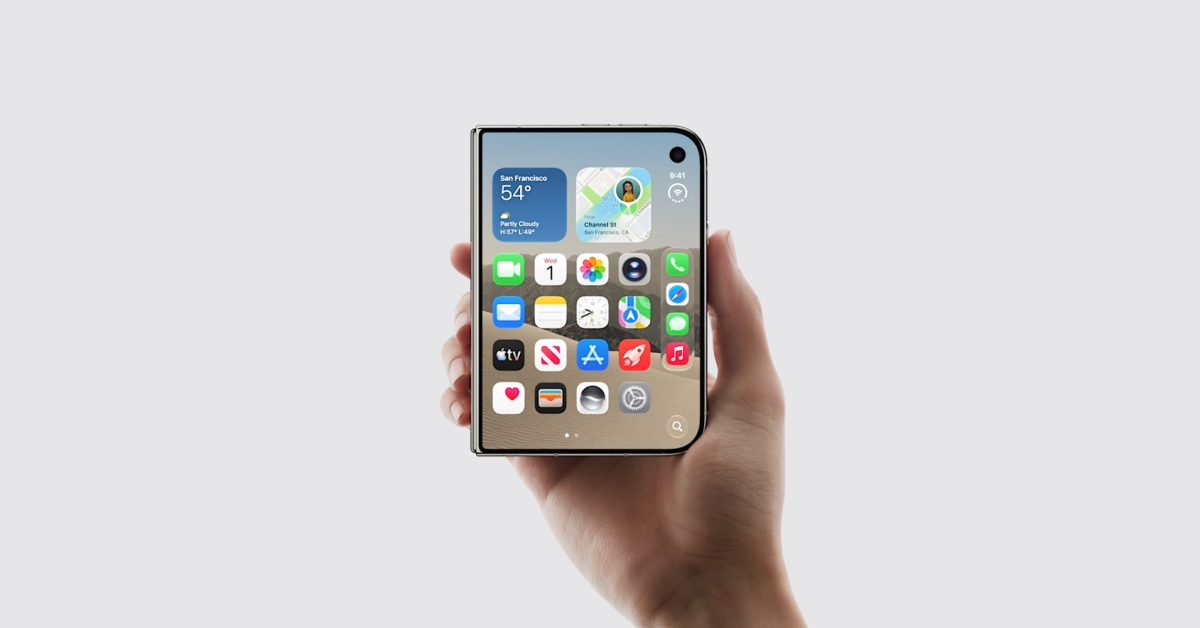
- Apple has launched the iPhone Duo, its first foldable iPhone.
- Apple Pencil support is scheduled to arrive with iOS 27.2 and requires the Apple Pencil (USB-C).
- The iPhone Duo supports fast charging that can reach 50 percent in about 20 minutes with a compatible power adapter.
- Apple does not include a power adapter in the box, only a USB-C cable.
- Accessory options already include cases, MagSafe car mounts, chargers, and HomeKit-compatible cameras.
- Apple Pencil (USB-C) is priced at $69, down from $79.
The launch of Apple’s first foldable iPhone creates a new accessory moment for Apple users. The iPhone Duo is not just another iPhone in a familiar slab shape; it introduces a different set of use cases, including stylus input, a larger inner display, and a StandBy experience that can take advantage of the foldable form factor. For buyers who picked up the device on launch day, the right add-ons can make the difference between treating the iPhone Duo as a novelty and using it as a flexible productivity and entertainment device.
Below are five top accessory categories for the iPhone Duo, with key details on pricing, compatibility, and practical use. The list covers the Apple Pencil, fast charging, car mounting, protective cases, and HomeKit cameras for StandBy mode, plus one bonus recommendation that is not foldable-specific but remains useful for many iPhone owners.
Apple Pencil turns the foldable into a notebook
The iPhone Duo is the first iPhone to support Apple Pencil, and that alone makes it a notable shift for Apple’s smartphone lineup. The feature is not available at launch; Apple says Apple Pencil support will arrive next week through the iOS 27.2 software update. Compatibility is also limited: the iPhone Duo requires an Apple Pencil (USB-C), and no other Pencil model is supported.
That detail matters for anyone who already owns an older Apple Pencil. The USB-C model is the only supported option, so buyers should check their existing accessories before assuming they can pair a stylus they already have. The Apple Pencil (USB-C) is currently priced at $69, down from $79.
On the iPhone Duo, Apple Pencil input works on both the outer display and the inner display. That gives the device a wider range of uses than a standard iPhone. The outer screen can handle quick notes, signatures, or markups without opening the device, while the larger inner display is better suited to sketching, longer handwritten notes, PDF annotation, and detailed editing. Apple has said the design of its first foldable was inspired by the proportions of a standard A-series paper notebook, which helps explain why stylus support is such a natural fit.
For students, commuters, and creative professionals, the combination of a foldable screen and stylus input could reduce the need to carry a separate tablet for lightweight note-taking. It will not replace a dedicated tablet for every task, but it gives the iPhone Duo a distinct productivity angle. The main caveat is timing: buyers will need to install iOS 27.2 before they can use the feature, and they will need the correct USB-C Apple Pencil.
Fast charging needs the right power adapter
The iPhone Duo supports fast charging, with Apple claiming that the device can reach 50 percent in just 20 minutes. That is a useful improvement for a foldable phone, which has a larger display and can consume more power during heavy use. However, the fastest charging speeds depend on the power adapter.
As with other recent iPhones, the iPhone Duo does not come with a power adapter in the box. Buyers get a USB-C cable, but they must supply their own charger. Many households already have 20W chargers, and those can still be used, but they may not deliver the quickest charging performance. For the best results, Apple recommends a higher-output adapter.
Apple’s 40W Dynamic Power Adapter with 60W Max supports iPhone Duo fast charging and is priced at $34, down from $39. A third-party alternative is Anker’s 100W USB-C Charger with a 5FT cable, priced at $29. The Anker option offers more headroom for other devices, including laptops and tablets, while the Apple adapter is a simpler first-party choice.
The practical advice is straightforward: if you already own a capable USB-C charger, test it before buying another one. If you want the shortest possible charging stops, look for an adapter that explicitly supports the iPhone Duo’s fast-charging requirements. The charger is also worth considering as a shared accessory for travel, since a single high-output brick can power a phone, tablet, and laptop.
MagSafe car mount keeps the large display secure
A MagSafe car mount is a useful accessory for almost any iPhone, but it becomes more important with a foldable device. The iPhone Duo has a larger display than a standard iPhone, and drivers will want a secure, easy-to-reach place to mount it. ESR’s MagSafe Car Mount is a recommended option, priced at $19, down from $29.
The mount uses MagSafe’s magnetic attachment to hold the iPhone in place, and it clips to an air-conditioning vent. That placement keeps the phone visible and within reach without requiring a dashboard adhesive or a complicated installation. For drivers who use CarPlay, the setup can be especially practical: the in-vehicle screen can show Apple Maps navigation, while the iPhone can display step-by-step directions or other information.
With the iPhone Duo’s larger screen, that split arrangement could be more useful than on a standard iPhone. The phone can show a fuller route view, media controls, or a passenger-friendly interface while the CarPlay screen handles the main map. A strong magnetic connection is essential, especially over bumps and during sudden stops, so buyers should choose a mount designed for MagSafe rather than a generic magnetic holder.
The ESR mount is also affordable compared with many car accessories, which makes it an easy add-on for launch buyers. It is not a charging mount, so drivers will still need to connect a cable for power on longer trips, but it solves the mounting problem cleanly.
Case options span budget and first-party choices
Foldable phones need cases that account for hinges, folds, and multiple display surfaces, so buyers should pay attention to fit and compatibility. Several third-party iPhone Duo cases are already available alongside Apple’s first-party offerings. The range includes budget-friendly options with built-in stands and more premium clear cases.
The SPIDERCASE Magnetic Case is priced at $29 and includes a built-in stand and screen protector. That combination makes it a practical choice for buyers who want protection and hands-free viewing without spending a lot. The built-in stand is especially relevant for the iPhone Duo’s StandBy features, since the phone can be propped up for desk or bedside use.
The Spigen Ultra Hybrid Pro is priced at $39 and is a clear case that is MagSafe-compatible. A clear case can show off the iPhone Duo’s design while still providing protection, and MagSafe compatibility preserves access to magnetic mounts and accessories. Buyers who already use MagSafe car mounts or wallets will want to confirm that any case they choose supports magnets.
Apple’s own options include the iPhone Duo Folio with Kickstand at $129 and the iPhone Duo Case at $79. The Folio with Kickstand is the more feature-rich first-party choice, adding a stand for watching video, making video calls, or using StandBy mode. The standard iPhone Duo Case is the simpler option for buyers who want Apple’s fit and finish without the folio cover.
Because foldable cases often include multiple pieces or hinge protection, buyers should check reviews and compatibility details before ordering. A case that blocks the outer display, interferes with the hinge, or prevents the phone from folding flat will be more frustrating than useful. The best choice depends on whether the priority is slimness, stand functionality, screen protection, or MagSafe support.
HomeKit cameras pair with StandBy mode
The iPhone Duo includes a powerful upgrade to the current iPhone StandBy feature. When the device is in standing mode, it can display a variety of StandBy views even when it is not charging. That is a meaningful change because it makes the foldable more useful as a desk, kitchen, or bedside display.
Among the StandBy options are Home Camera and Home Modular views, both of which provide access to smart home accessories. The Home Camera view is designed to help users keep track of security cameras throughout the home at a glance. For anyone with compatible cameras, the iPhone Duo could become a convenient always-visible monitor when it is propped up and idle.
Two recommended HomeKit-compatible cameras are the Aqara G100 2K security camera at $39 and the eufy 4K security camera at $69. The Aqara model is a budget-friendly option for basic indoor monitoring, while the eufy model adds 4K resolution for buyers who want more detail. Both are positioned as affordable choices rather than high-end professional systems.
Buyers should confirm HomeKit compatibility before purchasing a camera for this use. The StandBy experience depends on the camera working with Apple’s smart home framework, and not every security camera supports HomeKit. For households already using HomeKit, adding a compatible camera can make the iPhone Duo’s standing mode more useful and more integrated with the rest of the home.
Bonus: AirPods Pro 3
AirPods Pro 3 are not specifically designed for the iPhone Duo, but they remain a strong companion accessory for anyone who does not yet own AirPods or is upgrading from an older model. They are priced at $199, down from $249.
The appeal is familiar: strong noise cancellation, a compact wireless design, and deep integration with Apple devices. For iPhone Duo owners, AirPods Pro 3 can be useful for calls, media, and focus during work. Noise cancellation is particularly valuable in shared spaces, and the latest features add to the overall experience.
Because the iPhone Duo is a new form factor, buyers may be tempted to spend entirely on foldable-specific accessories. AirPods Pro 3 are a reminder that some of the most useful add-ons are not tied to the shape of the phone. They work across Apple devices and can improve the day-to-day experience regardless of whether the iPhone is folded or open.
Source:9to5Mac News