

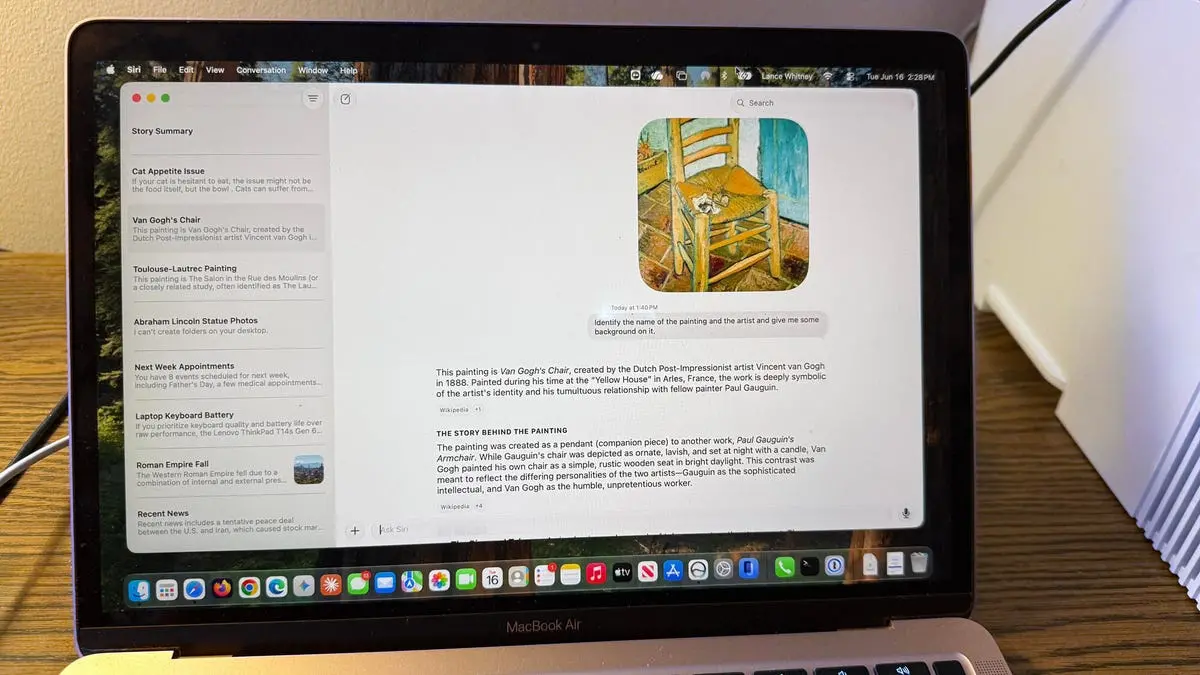
As a long-time iPhone and Mac user, I've often voiced frustration with Siri's limitations—misunderstood requests, irrelevant answers, and a general lack of conversational depth. So when Apple announced a revamped Siri AI at WWDC 2026, I was eager to put it through its paces. Now that I've tested the developer beta on my MacBook Air M1, here's a detailed look at how the new Siri stacks up against ChatGPT and Gemini.
What is Siri AI and how to access it
Siri AI represents Apple's first major push into generative AI, tying into the broader Apple Intelligence platform. It's designed to understand context, handle follow-up questions, and retrieve device-specific information—much like ChatGPT and Gemini do for their respective ecosystems. However, Siri AI is still in its infancy, available only via a waitlist for developers on compatible devices running iOS 27, iPadOS 27, and MacOS 27.
To join the waitlist, you need a device with an M-series or A17 Pro chip (or newer). On a Mac, open System Settings, navigate to Siri, and request access. After some days (or weeks), you'll receive notification that Siri AI is ready. I waited only a few hours on my Mac, while my iPhone remained pending. Once activated, you can invoke Siri AI by voice, by double-pressing the Command key, or via the dedicated Siri AI app on the Dock.
The tests: How Siri AI performed
I designed 10 scenarios to evaluate Siri AI across general knowledge, device control, file analysis, and conversational flow. The same questions were asked to ChatGPT and Gemini on MacOS 27 for comparison. Below are the results, with screenshots taken during testing.
1. What's new?
I started with a simple opening question. Siri AI responded with a list of recent news headlines, read aloud in a natural tone. It didn't engage in small talk or ask about my day—instead, it acted like a direct assistant. ChatGPT and Gemini would typically offer a more conversational reply, but Siri's focus on utility was consistent with Apple's design philosophy.
2. Why did the Roman Empire fall?
This history question prompted Siri to deliver a concise summary with bullet points, citing sources from Apple News and Wikipedia. The response lasted about 30 seconds when read aloud—comparable to other AI assistants. Siri correctly identified key factors: economic decay, military overspending, and political corruption. It also provided clickable source links. ChatGPT gave a similar answer but with more narrative detail.
3. Should I buy a $2,000 laptop?
I asked Siri for a laptop recommendation, specifying that keyboard quality and battery life were more important than performance. Initially, Siri only returned links to reviews and social media posts without summarizing them. When I followed up with “summarize that information and give your opinion,” it then provided a helpful analysis suggesting Dell XPS and MacBook Pro variants. This revealed Siri's potential, but also its need for more precise prompting.
4. Show me my appointments for next week
Device-aware Siri quickly accessed my Calendar and displayed all scheduled events correctly. This worked seamlessly, confirming that Siri AI can integrate deeply with system apps. ChatGPT and Gemini lack this native access on MacOS.
5. Find photos of Abraham Lincoln statue
I asked Siri to locate photos of the Lincoln statue in my Photo Library. It returned only three images, while my library contained six relevant photos. Subsequent requests with other subjects (e.g., “sunset at the beach”) also missed some results. The precision needs improvement—likely a sign of early AI models still learning per-device metadata.
6. Turn on Do Not Disturb
Siri handled this system control instantly. When I said “Turn on Do Not Disturb,” the mode activated without delay; asking to turn it off worked just as well. This is a strong point for Siri AI, outperforming third-party assistants that require additional permissions.
7. Analyze a painting from an image
I uploaded a photo of Toulouse-Lautrec's “Jane Avril” (from my files) and asked for identification. Siri misidentified both the painting and the artist. I retried with Van Gogh's “Starry Night”—this time it got the artist right but the painting name wrong. Only on the third attempt (with another Van Gogh piece) did Siri succeed. In contrast, ChatGPT correctly identified all three on the first try.
8. My cat won't eat—advice needed
This was a test of empathetic and practical reasoning. Siri asked clarifying questions (“Does your cat eat wet or dry food?”) after I described the issue. It then provided solid suggestions: try warming the food, check for dental issues, and consult a vet. However, the conversation flow was clunky—I had to manually reactivate the microphone after each response. ChatGPT and Gemini maintained a continuous dialogue without such interruptions.
9. Summarize what's on the screen
Using the right-click Ask Siri option, I tested on-screen summarization. Initially, saying “summarize the story” produced no response; “summarize what you see on the screen” only summarized visible text. Finally, “summarize the story on the screen” triggered a full summary of an article about WWDC. This underscores the importance of precise phrasing—an issue less pronounced with ChatGPT, which often infers intent.
10. Review past conversations and correct errors
Siri AI keeps a history of all conversations, which you can rename, pin, or delete. I revisited a chat where Siri had earlier misidentified a painting. When I said “you were wrong about that painting,” it attempted to correct itself but remained inaccurate until I explicitly provided the correct artist name—then it gave proper details. This capability to revisit and correct is present in ChatGPT and Gemini too, but Siri's process felt less intuitive.
Overall observations
After running all tests, the new Siri AI shows clear improvements over old Siri. It handles device controls excellently, retrieves calendar data correctly, and offers basic general knowledge responses. However, it lags in accuracy (especially with visual recognition), conversational fluidity (requires manual re-activation), and natural language understanding (needs very specific phrasing).
Apple has positioned Siri AI as an assistant that respects privacy through on-device processing—a differentiator from cloud-dependent assistants. Yet the trade-off is slower responses and occasional errors. The beta phase likely contributes to many of the hiccups; Apple has months of development ahead before the September public release.
Comparisons with ChatGPT and Gemini reveal that Siri AI is currently less robust in open-ended reasoning and file analysis, but more integrated with system functions. For users deeply embedded in Apple's ecosystem, the new Siri promises a smarter helper—if Apple can iron out the accuracy and conversation issues. It's off to a promising start, but the competition remains formidable.
Source:ZDNET News