

Apple is preparing to release watchOS 27 later this month, and the update will change the way the Apple Watch behaves in several noticeable ways. While most of the attention has been on new watch faces and health features, three existing capabilities are being removed or significantly altered. For anyone using those features every day, the transition may require a little time and patience. Here is what is going away and why Apple appears to have made those choices.
Walkie-Talkie is gone
The first significant removal is Walkie-Talkie, Apple’s real-time voice communication feature that worked exclusively between Apple Watches. The Walkie-Talkie app allowed two people to hold live voice sessions by pressing and holding a button on screen, similar to a traditional two-way radio. It used FaceTime audio infrastructure and required both participants to have Apple Watches with cellular or Wi-Fi connectivity.
Walkie-Talkie was introduced as a headline feature in watchOS 5 in 2018. At the time, Apple presented the ability to instantly connect with another Apple Watch owner as a fun and useful way for families, crews, and friends to stay in touch. The app was even temporarily disabled in 2019 due to a security concern. It later returned, but never became a core part of the platform for many users.
Some people depended on Walkie-Talkie in real-world situations, including shift workers, hiking groups, and parents who wanted a reliable way to reach their children. For those users, losing the feature represents more than just an app removal. Apple has not announced a direct replacement. A third-party app might approximate the functionality, but it cannot match the system-level integration and the simple push-to-talk experience that came with the Apple Watch hardware. A cross-platform version that also worked on the iPhone might be more sustainable in the long run, but so far nothing was introduced before the removal.
Digital Crown double-click multitasking shortcut disappears
The second change involves the Digital Crown. Previously, double-clicking the Digital Crown while using an app would launch the App Switcher, letting users move quickly between recently used apps or return to the watch face. That shortcut no longer works in watchOS 27. Instead, a double-click on the Digital Crown does the same thing as a single click, which opens the new dynamic app grid.
This is a significant change for users who learned to rely on the double-click as a fast navigation method. The Apple Watch has a small screen and limited controls, so button shortcuts are important. Multitasking on Apple Watch has always been subtle, but the double-click gesture provided a consistent way to jump between two apps without digging through scrolling lists.
It is not clear whether this removal is intentional as a permanent shift or if Apple plans to bring multitasking back in a different form. The company has been experimenting with how people use the Digital Crown and side button. Because the watch now has a dynamic app grid that appears on a single click, it is possible that Apple considered the double-click redundant. But that line of thinking may not account for the muscle memory of users who used two clicks to switch between a workout and a message, or between a timer and the watch face.
The Watch has very few physical buttons and input methods. The Digital Crown is used for scrolling, zooming, and navigating. The side button handles recent apps, power controls, and Apple Pay. Since those controls are not easy to replace, many users will hope that Apple finds a new use for the double-click gesture. Even if it is not an app switcher, there should be something assigned to that gesture instead of treating it as no different from a single click.
Dynamic app grid always appears first
The third change is perhaps the most visible because it affects the simplest interaction on the watch: pressing the Digital Crown once. Since the first version of watchOS, pressing the Digital Crown from the watch face or while inside an app opened the full app launcher. That launcher displayed all installed apps in an adjustable grid or list. In watchOS 27, a single click no longer opens that full launcher.
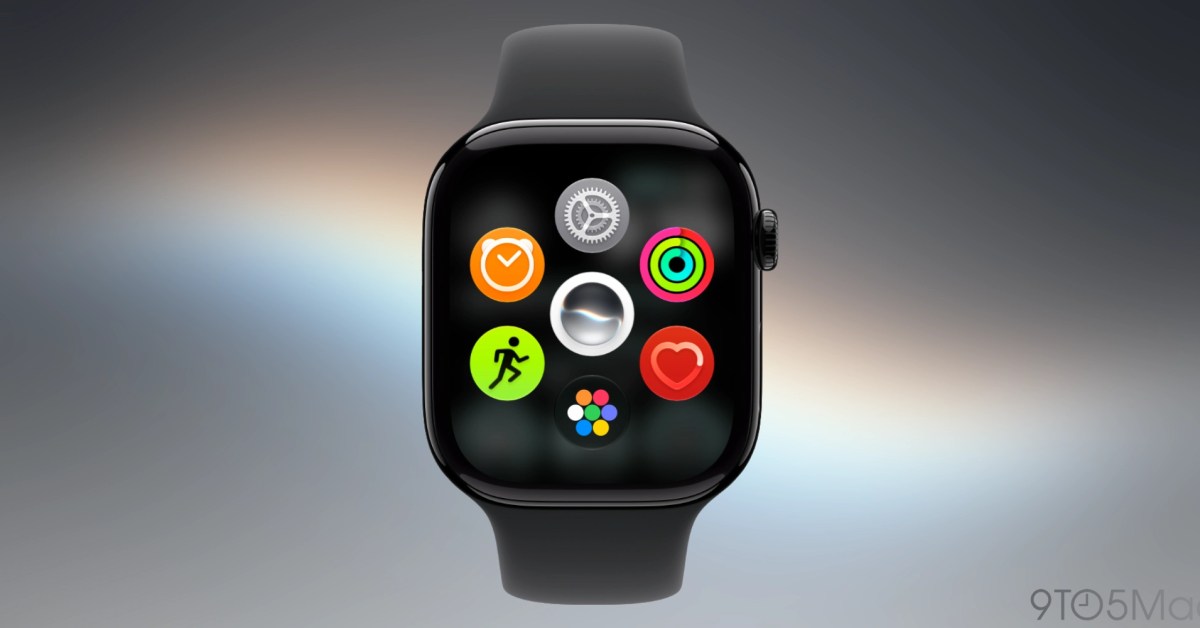
Instead, watchOS 27 opens what Apple calls the dynamic app grid. This new screen shows five intelligently suggested apps, the Siri app, and an icon that opens the full app launcher. Users can also scroll the Digital Crown upward to reach the full app grid or list. The intention appears to be to make the app screen easier to use with fewer icons and larger touch targets. Apple has increasingly tried to reduce the cognitive load on watchOS, and the dynamic app grid is another step in that direction.
This is not the first time Apple has changed how clicking the Digital Crown works in relation to the app grid. In an earlier version of watchOS, the first click after returning to the watch face would center the app grid, which caused confusion. That intermediate step was eventually removed, and now the new dynamic grid replaces the full grid as the destination for every first click.
The dynamic grid has some appeal. It positions frequently used apps front and center and makes Siri more visible. But it adds an extra step for anyone who wants to open an app that isn't in the five suggestions. A user might click the Digital Crown, see five irrelevant apps, then click again or scroll to the full icon to open a specific app. Over time, the system may learn which apps are more relevant, but out of the box, the suggestions can feel slower than simply browsing the full list.
Accessibility users may also notice the change. People who have difficulty seeing small icons or who rely on predictable navigation may find the dynamic app grid harder to use than a straightforward alphabetical list. For all its benefits to some users, the removal of the first-click full launcher is not a neutral change.
Adjusting to watchOS 27
Any major operating system update brings a period of adjustment, and watchOS 27 is no different. Walkie-Talkie has already disappeared for beta testers, and it will vanish for the rest of the Apple Watch community when the update arrives. The double-click multitasking shortcut will no longer be there, and the familiar single-click app launcher will be replaced by the dynamic grid. For some users, these changes will require relearning basic interactions.
That can be frustrating on a device designed to make tasks faster. The Apple Watch is often used at a glance, and even one extra click can matter while someone is working out, cooking, or walking. It is easy to understand why Apple might believe suggestion-based app discovery is more approachable for new users, but experienced users may not agree that losing the traditional launcher improves the product.
At the same time, watchOS 27 is not just about removals. New capabilities related to intelligence, glanceable information, and deeper integration with iOS are part of the release. Apple has made it clear it wants watchOS to feel simpler and more proactive. The dynamic app grid and the removal of Walkie-Talkie should be viewed through that lens, even if the execution is debatable. The company is not simply deleting features arbitrarily; it is trying to reshape how people interact with the watch.
Yet some removals are harder to accept. The Explorer watch face, which was popular with outdoor and sports-focused users, has been questioned by enthusiasts for years because watch faces are a unique and user-removable part of watchOS. If Apple is willing to take away old faces while adding new ones, it is clear that not every long-standing option will survive the transition. For people who hold onto old favorites, the hope is that Apple will bring back some of the deleted options in a future release.
For now, the release of watchOS 27 means Apple Watch users should be prepared for a different first-run experience. Walkie-Talkie will be missing from the communication list, double-clicking the Digital Crown will not leap between apps, and opening an app will require passing through a curated grid full of suggestions. Whether these choices become the accepted state of watchOS or remain temporary experiments will depend on user feedback and the next update cycle. Until then, current Apple Watch owners have only a short time left with the old behavior.
Source:9to5Mac News